RFID - PN532
.
Plugin details
Type: RFID
Name: PN532
Status ESP32: NORMAL
Status ESP8266: NORMAL
GitHub: P017_PN532.ino
Maintainer: .
Used libraries: .
Description
This device reads the tag ID from Mifare tags, cards and stickers using the NXP PN532 NFC chip.
The value is placed in the Tag variable, and can be read from rules and sent to controllers.
Settings
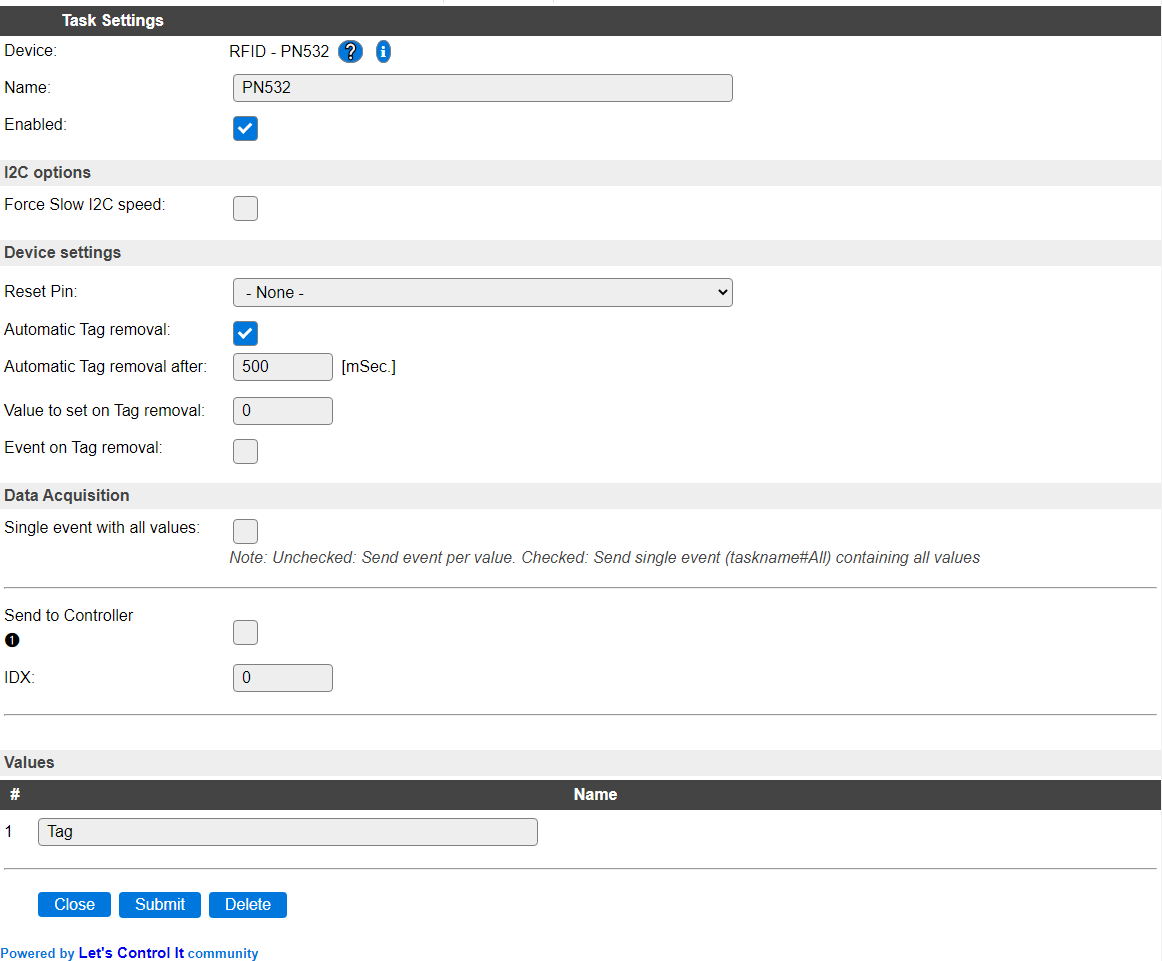
Name: The name for this task, should be unique.
Enabled: Allows to enable/disable the device.
Depending on the type of ESPEasy build installed on the unit, the I2C settings may differ, but all builds at least have the below setting. (Complete settings are explained on the documentation for the Hardware page)
Force Slow I2C speed: When checked uses the Slow device clock speed, as configured on the Hardware page, for this device. This enables older or slower I2C devices to be used while other devices use the normal (higher) speed.
Reset Pin: Optional pin that is pulled low when communication with the device fails a few times.
Automatic Tag removal (Enabled by default) after scanning a tag, it can be automatically removed (reset).
Automatic Tag removal after (Default 500 mSec) The timeout in milli seconds (range 250 - 60000) after which the last Tag will be automatically removed, if that option is enabled.
Value to set on Tag removal (Default 0) Set a value to the Tag when the previous tag is removed. (Range 0 to 2147483647 as larger values are difficult to store in settings.)
Event on Tag removal (Disabled by default) When enabled sends the removed Tag value as an event and to all enabled controllers.
Data Acquisition
This group of settings are standard available configuration items.
Single event with all values: When this setting is enabled, all available values will be sent in a single event
<TaskName>#All, with all values in order as arguments to the event.Show derived values: When checked, the Devices overview page, and the
/jsonendpoint (used for updating the Devices overview page) will include any Derived values as defined. See theTaskValueSetDerivedandTaskValueSetPresentationcommands.Event & Log derived values: When checked, the Derived values will be generated as Events, to be handled in Rules, and sent to logging devices like the Syslog server and/or SD-card logging.
(The derived values options are only available if String variables feature is included in the build.)
Send to Controller: Select the Controller(s) to send the Values to, either on a
TaskRuncommand applied to the task, or on an Interval time action.
Send to Controller is only visible when one or more Controllers are configured.
Depending on the controller capabilities, some configuration settings may be shown:

All configured Controllers are shown here, including the enabled or disabled state (multiple Controllers can be enabled, only a single MQTT Controller can be enabled at one time!).
For each controller the user can select wether the data should be sent on each Interval (or explicit TaskRun).
For the Domoticz controllers the value index (IDX) has to be configured.
For some controllers, like Home Assistant (openHAB) MQTT, there are extra options available.
Group: This represents the group id to combine all values from multiple tasks into a single grouped-device during MQTT AutoDiscovery. Groups, by design, can span multiple ESPEasy devices, if desired, as long as the Task/Valuename combinations are unique. If a group should only combine Tasks from a single ESPEasy unit, the group id should be unique across multiple ESPEasy units. The group description, default Group <n>, can be adjusted in Home Assistant. If the Group value matches the current Unit nr, the Unit name,
%sysname%, is used instead of Group <nr>.When Group is used, the Discovery unique id, by default, doesn’t include the taskname, causing devices with the same Value name in the same group to be overwritten in the MQTT broker. By setting the checkbox MQTT Discover, Group incl. Taskname on the Tools/Advanced page, the unique id will be made ‘more unique’ by including the Taskname. (Not enabled by default for backward compatibility).
Retained: For MQTT Controllers, this setting can be enabled to send the values for the current task with the Retain flag set. The Publish Retain flag in the Controller settings will override this by sending all task values with Retain flag enabled.
Send derived: This checkbox determines if any configured Derived values should also be sent to the controller (and included in the AutoDiscovery if that’s available and enabled).
Resend MQTT Discovery: When checked, will initiate a resend of the MQTT Discovery process for this task after a random delay after Submit is clicked, so any changed settings will be updated in the MQTT broker. This setting is only available if the controller is enabled, the Auto Discovery feature is available and enabled for the controller. This setting is not stored.
Other controllers, like f.e. FHEM HTTP, do not support additional settings besides the checkbox to enable sending the data.
Supported hardware
PN532 based NFC RFID reader connected via I2C on address 0x24.
Warning
This device needs the I2C ClockStretchLimit (Tools/Advanced page) be set to 2000 (msec) to work as intended.
.
Change log
Changed in version 2.0: …
added Major overhaul for 2.0 release.
added 2021-01-23: Extra options for tag reset and event on tag reset.
Added in version 1.0: …
added Initial release version.