Generic - System Info
.
Plugin details
Type: Generic
Name: System Info
Status ESP32: NORMAL CLIMATE
Status ESP8266: NORMAL CLIMATE
GitHub: P026_Sysinfo.ino
Maintainer: .
Used libraries: .
Introduction
To monitor some internal values of an ESPEasy equiped device, the SysInfo plugin is available. This device can show up to 4 values showing user-selected system data.
Configuration
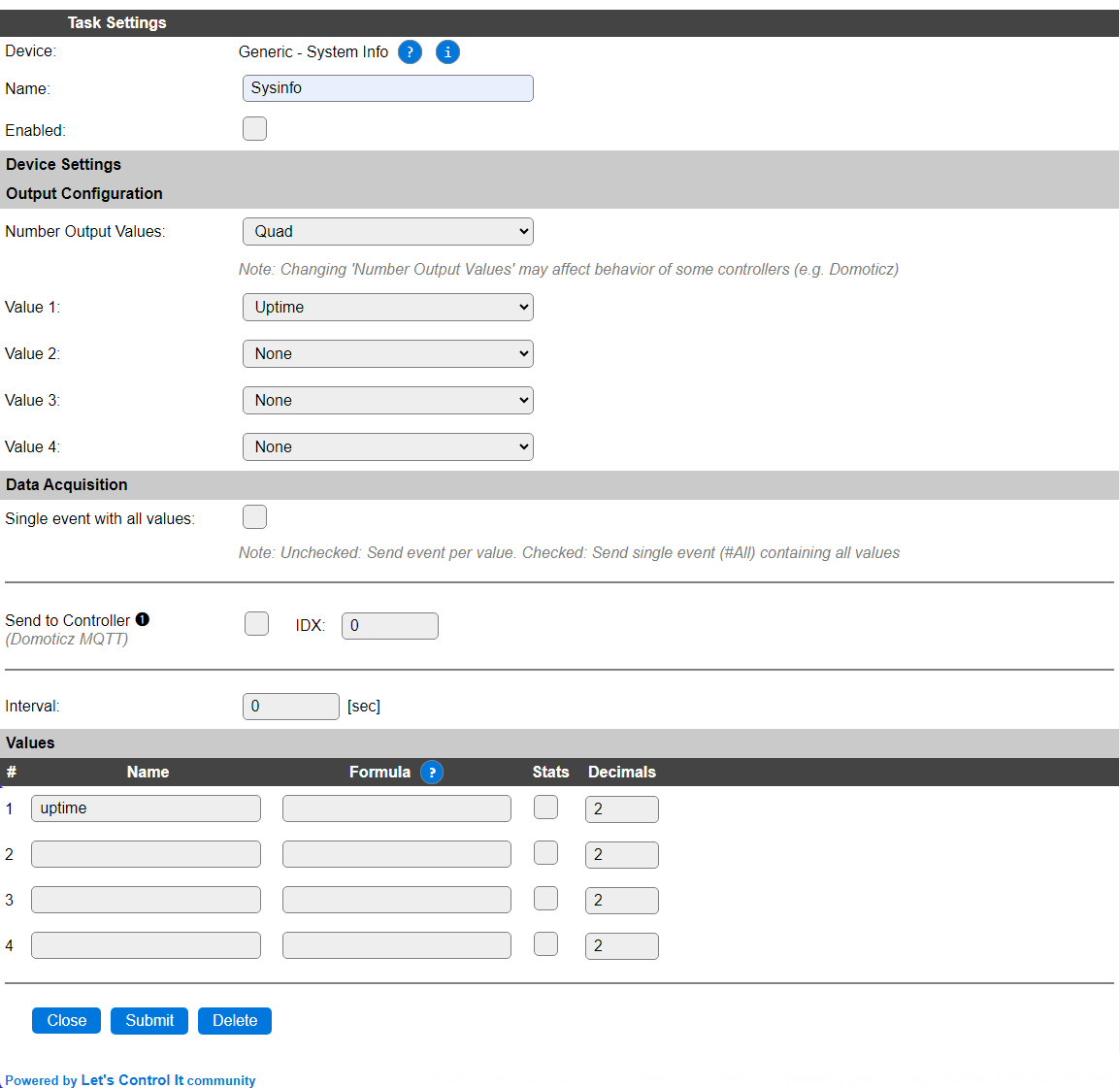
Name A unique name should be entered here.
Enabled The device can be disabled or enabled. When not enabled the device should not use any resources.
Output configuration
Number Output Values: Select from 1 to 4 output values, default is 4 (Quad). If more values are to be used, multiple tasks can be configured using this plugin.

Value 1..4: Depending on the Number Output Values selection, 1 to 4 selections for output values are available. These can be chosen as desired.
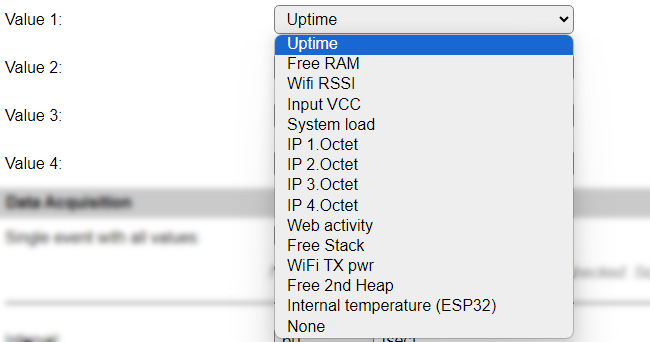
Uptime: The uptime of the unit in minutes.
Free RAM: The amount of free memory in bytes.
Wifi RSSI: The RSSI (Received signal strength indicator) value. This is a negative value.
Input VCC: The voltage applied to the 3.3V VCC input of the ESP. This value is only available on ESP8266 builds with VCC enabled (included in the build name), else 0 will be shown.
System load: The load as displayed on the Main and Info pages, a percentage in range 0 .. 100.
IP 1.Octet .. IP 4.Octet: The separate parts of the active IP address of the unit, the octets are counted from left to right.
Web activity: The time passed since the last web activity at the unit. Measured in seconds.
Free Stack: The available stack space in bytes.
WiFi TX pwr: The current setting for transmit power via WiFi. This is determined dynamically, depending on the corresponding settings in the Tools/Advanced page, RSSI and other factors.
Free 2nd Heap: The available memory on the 2nd heap, only available in some specific ESP8266 builds, else it shows 0.
Internal temperature (ESP32): The internal temperature of the ESP. Only available on ESP32 units. For ESP32-S2/S3/C2/C3/C6 MCUs there is official support for the internal temperature sensor via the Espressif libraries, that has compensation applied so it shows a realistic value. For ESP32 Classic this is determined empirically, based on the deviation of the 150 kHz internal clock generator, that is rather temperature dependent, compared to the (stable) crystal frequency. This should not be seen as an absolute temperature, but can be used as a relative measurement f.e. when comparing heavy load vs. light load situations.
None: No value.
Data Acquisition
This group of settings are standard available configuration items.
Single event with all values: When this setting is enabled, all available values will be sent in a single event
<TaskName>#All, with all values in order as arguments to the event.Show derived values: When checked, the Devices overview page, and the
/jsonendpoint (used for updating the Devices overview page) will include any Derived values as defined. See theTaskValueSetDerivedandTaskValueSetPresentationcommands.Event & Log derived values: When checked, the Derived values will be generated as Events, to be handled in Rules, and sent to logging devices like the Syslog server and/or SD-card logging.
(The derived values options are only available if String variables feature is included in the build.)
Send to Controller: Select the Controller(s) to send the Values to, either on a
TaskRuncommand applied to the task, or on an Interval time action.
Send to Controller is only visible when one or more Controllers are configured.
Depending on the controller capabilities, some configuration settings may be shown:

All configured Controllers are shown here, including the enabled or disabled state (multiple Controllers can be enabled, only a single MQTT Controller can be enabled at one time!).
For each controller the user can select wether the data should be sent on each Interval (or explicit TaskRun).
For the Domoticz controllers the value index (IDX) has to be configured.
For some controllers, like Home Assistant/openHAB, there are extra options available.
Group: This represents the group id to combine all values from multiple tasks into a single grouped-device during MQTT AutoDiscovery. Groups, by design, can span multiple ESPEasy devices, if desired, as long as the Task/Valuename combinations are unique. If a group should only combine Tasks from a single ESPEasy unit, the group id should be unique across multiple ESPEasy units. The group description, default Group <n>, can be adjusted in Home Assistant. If the Group value matches the current Unit nr, the Unit name,
%sysname%, is used instead of Group <nr>.Retained: For MQTT Controllers, this setting can be enabled to send the values for the current task with the Retain flag set. The Publish Retain flag in the Controller settings will override this by sending all task values with Retain flag enabled.
Send derived: This checkbox determines if any configured Derived values should also be sent to the controller (and included in the AutoDiscovery if that’s available and enabled).
Resend MQTT Discovery: When checked, will start a resend of the MQTT Discovery process for this task after a random delay, when Submit is clicked, so any changed settings will be updated in the MQTT broker. This setting is only available if the controller is enabled, the Auto Discovery feature is available and enabled for the controller. This setting is not stored.
Other controllers, like f.e. FHEM HTTP, do not support additional settings besides the checkbox to enable sending the data.
Interval By default, Interval will be set to 60 sec. The data will be collected, and event(s) generated, using this interval.
Get Config values
These values are not available in Minimal OTA builds.
Config value |
Information |
|---|---|
[<taskname>#uptime] |
Returns the uptime of the unit in minutes.
|
[<taskname>#freeheap] |
Returns the amount of free memory in bytes.
|
[<taskname>#rssi] |
Returns the RSSI (Received signal strength indicator) value. This is a negative value.
|
[<taskname>#vcc] |
Returns the voltage applied to the 3.3V VCC input of the ESP. This value is only available on ESP8266 builds with VCC enabled (included in the build name), else 0 will be shown.
|
[<taskname>#load] |
Returns the load as displayed on the Main and Info pages, a percentage in range 0 .. 100.
|
[<taskname>#ip1] .. [<taskname>#ip4] |
Returns the separate parts of the active IPv4 address of the unit, the parts 1..4 are counted from left to right.
|
[<taskname>#web] |
Returns the time passed since the last web activity at the unit. Measured in seconds.
|
[<taskname>#freestack] |
Returns the available stack space in bytes.
|
[<taskname>#txpwr] |
Returns the current setting for transmit power via WiFi. This is determined dynamically, depending on the corresponding settings in the Tools/Advanced page, RSSI and other factors.
|
[<taskname>#free2ndheap] |
Returns the available memory on the 2nd heap, only available in some specific ESP8266 builds, else it shows 0.
|
[<taskname>#internaltemp] |
Returns the internal temperature of the ESP. Only available on ESP32 units. For ESP32-S2/S3/C2/C3/C6 MCUs there is official support for the internal temperature sensor via the Espressif libraries, that has compensation applied so it shows a realistic value. For ESP32 Classic this is determined empirically, based on the deviation of the 150 kHz internal clock generator, that is rather temperature dependent, compared to the (stable) crystal frequency. This should not be seen as an absolute temperature, but can be used as a relative measurement f.e. when comparing heavy load vs. light load situations.
|
Change log
Changed in version 2.0: …
added 2023-09-25 ESP32 Internal temperature sensor option, Get Config values
added Major overhaul for 2.0 release.
Added in version 1.0: …
added Initial release version.