UVR61-3 (up to v8.2)
Heating - DL-Bus (Technische Alternative) COLLECTION C
Introduction
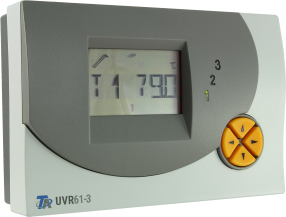
The UVR61-3 unit is a three-circuit universal control system.
The UVR61-3 unit is designed for an energy-saving and cost-effective drying of cellars and other parts of buildings by means of fan control.
The UVR61-3 three-circuit controllers has various thermostat, differential temperature and speed control functions for use in solar and heating systems, too.
This data frame for UVR61-3 is only valid for firmware up to v8.2.
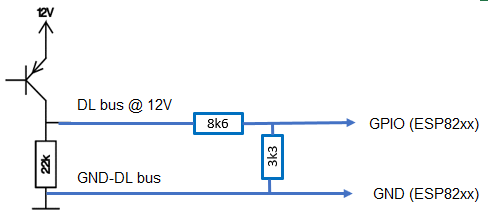
The DL bus runs at 12 volts.
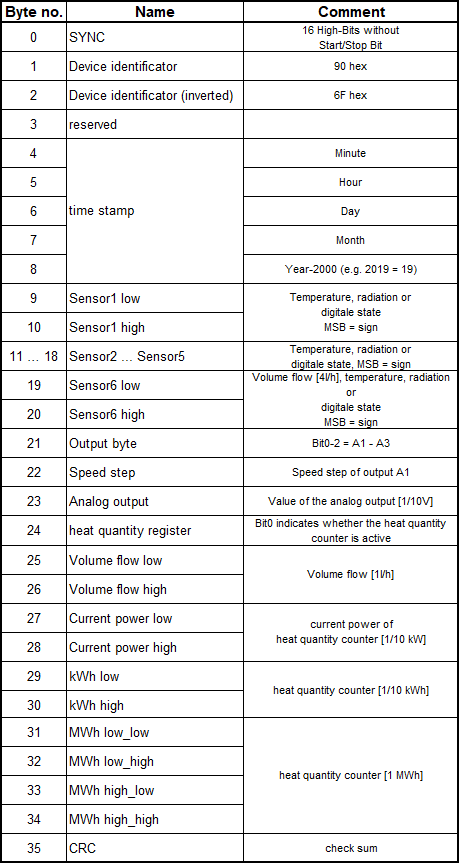
The data frame consist of 34 bytes (excluding sync and CRC).
The data are transmitted @ 488Hz, therefore the transmission of one data set takes about 0.8 seconds.
Wiring
Protocol
Setup
Note
A new device task must be created for each value to be read from the DL bus!
Task settings
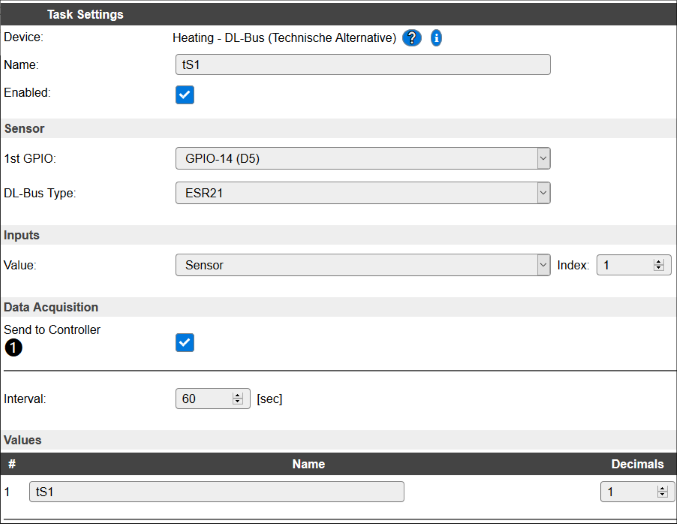
Device: Heating - DL-Bus (Technische Alternative)
Name: Name of the task (example name ValueN, where N is a number).
Enable: Should the task be enabled or not
Sensor
1st GPIO: DL bus input e.g. GPIO 14 (D5)
DL-Bus Type: UVR61-3 (up to v8.2)
Note
The settings for 1st GPIO and DL-Bus Type must be the same for all used DL bus tasks!
Inputs
Note
The description of the Frame data and the related Frame bytes can be found in the section Protocol!
Frame data |
Frame bytes |
Value |
Index |
Decimals |
|---|---|---|---|---|
Sensor1 … Sensor6 |
9 … 20 |
Sensor |
1 - 6 |
1 |
Output A1 … A3 |
21 |
Digital Output |
1 - 3 |
0 |
Speed step |
22 |
Speed step |
0 |
|
Analog output |
23 |
Analog output |
1 |
|
Current power |
27,28 |
Heat power [kW] |
1 |
|
Heat quantity |
29 … 34 |
Heat meter [MWh] |
4 |
Data Acquisition
This group of settings are standard available configuration items.
Single event with all values: When this setting is enabled, all available values will be sent in a single event
<TaskName>#All, with all values in order as arguments to the event.Show derived values: When checked, the Devices overview page, and the
/jsonendpoint (used for updating the Devices overview page) will include any Derived values as defined. See theTaskValueSetDerivedandTaskValueSetPresentationcommands.Event & Log derived values: When checked, the Derived values will be generated as Events, to be handled in Rules, and sent to logging devices like the Syslog server and/or SD-card logging.
(The derived values options are only available if String variables feature is included in the build.)
Send to Controller: Select the Controller(s) to send the Values to, either on a
TaskRuncommand applied to the task, or on an Interval time action.
Send to Controller is only visible when one or more Controllers are configured.
Depending on the controller capabilities, some configuration settings may be shown:

All configured Controllers are shown here, including the enabled or disabled state (multiple Controllers can be enabled, only a single MQTT Controller can be enabled at one time!).
For each controller the user can select wether the data should be sent on each Interval (or explicit TaskRun).
For the Domoticz controllers the value index (IDX) has to be configured.
For some controllers, like Home Assistant/openHAB, there are extra options available.
Group: This represents the group id to combine all values from multiple tasks into a single grouped-device during MQTT AutoDiscovery. Groups, by design, can span multiple ESPEasy devices, if desired, as long as the Task/Valuename combinations are unique. If a group should only combine Tasks from a single ESPEasy unit, the group id should be unique across multiple ESPEasy units. The group description, default Group <n>, can be adjusted in Home Assistant. If the Group value matches the current Unit nr, the Unit name,
%sysname%, is used instead of Group <nr>.Retained: For MQTT Controllers, this setting can be enabled to send the values for the current task with the Retain flag set. The Publish Retain flag in the Controller settings will override this by sending all task values with Retain flag enabled.
Send derived: This checkbox determines if any configured Derived values should also be sent to the controller (and included in the AutoDiscovery if that’s available and enabled).
Resend MQTT Discovery: When checked, will start a resend of the MQTT Discovery process for this task after a random delay, when Submit is clicked, so any changed settings will be updated in the MQTT broker. This setting is only available if the controller is enabled, the Auto Discovery feature is available and enabled for the controller. This setting is not stored.
Other controllers, like f.e. FHEM HTTP, do not support additional settings besides the checkbox to enable sending the data.
Interval: How often should the task publish its value (10..60 seconds is normal).
Note
Interval not less than 10 seconds! The reading of the DL bus happens twice per interval.