Position - AS5600(L) Magnetic angle
AS5600 Magnetic angle and rotation sensor
Plugin details
Type: Position
Name: AS5600(L) Magnetic angle
Status ESP32: COLLECTION G CLIMATE
Status ESP8266: COLLECTION G CLIMATE
GitHub: P142_AS5600.ino
Maintainer: tonhuisman
Used libraries: https://github.com/RobTillaart/AS5600
Description
The AS5600 is a magnetic angle sensor, with 4096 step resolution for 360 degrees, effectively giving a resolution of 0.087 degrees. By using the low-power operation options the measurements will be available somewhat slower, but average power usage will be much lower.
The used library also has implemented a rotational speed measurement, when enough samples are available between reading the measurement.
Suggested implementations include contactless potentiometers, wind direction sensors and motor- or wind-powered rpm measurements.
Configuration
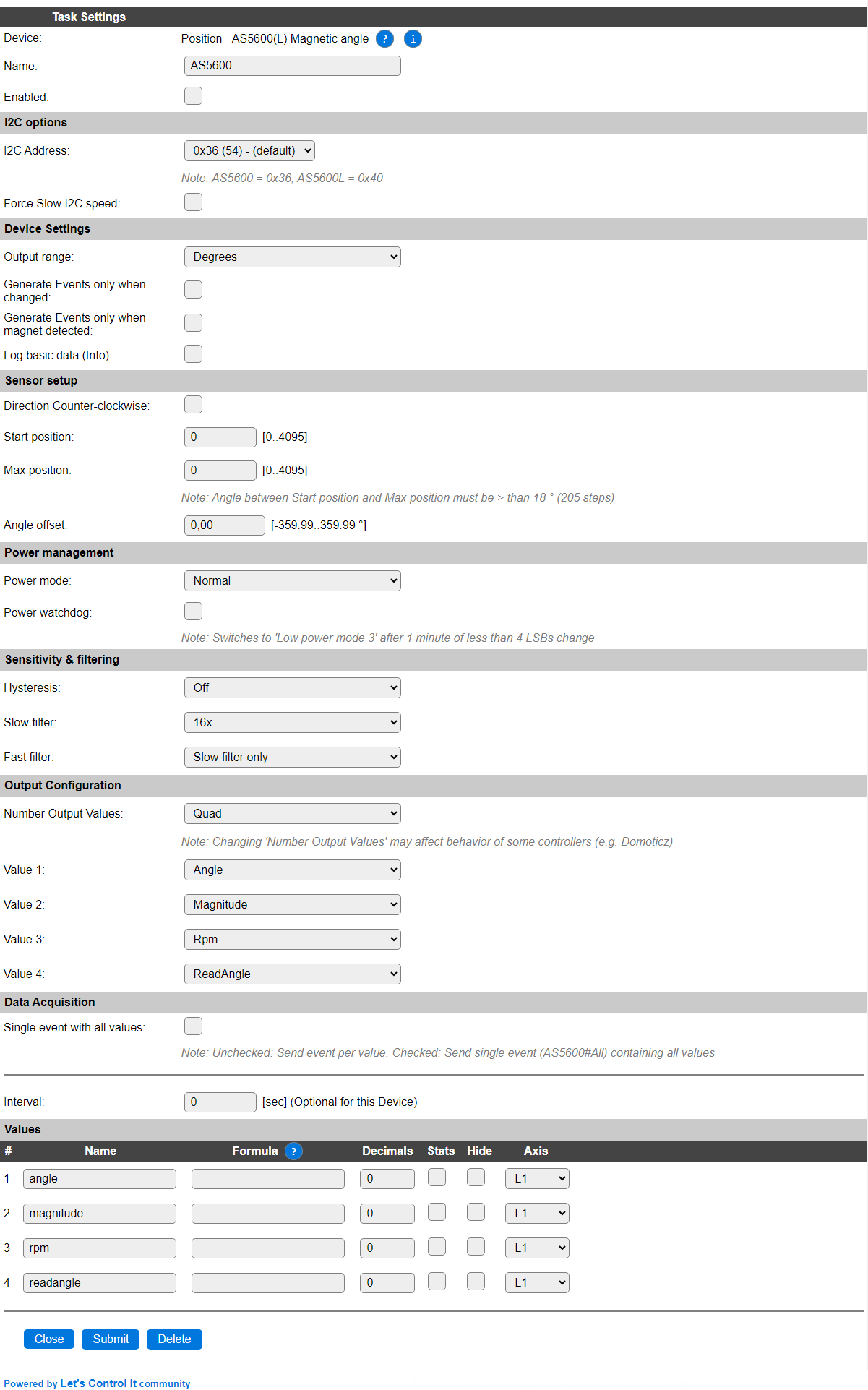
Name: Required by ESPEasy, must be unique among the list of available devices/tasks.
Enabled: The device can be disabled or enabled. When not enabled the device should not use any resources.
I2C options
The available settings here depend on the build used. At least the Force Slow I2C speed option is available, but selections for the I2C Multiplexer can also be shown. For details see the I2C Bus page
I2C Address: The address the sensor is using. The AS5600 uses I2C address 0x36 and the AS5600L has address 0x40, allowing 2 of these sensor on an I2C bus without using an I2C multiplexer.
Device Settings
Output range: Select the desired output range used, available options:

Degrees The default setting gives 0..360 degree value for the
Angleselection.Radians Recalculated angle value in radians.
Generate Events only when changed: When enabled, events will only be generated if (one of) the selected value(s) changes.
Generate Events only when magnet detected: When selected will suppress sending events if the magnet isn’t close enough to the sensor (0.5..3mm).
Log basic data (Info): When enabled the plugin will write INFO logging with the raw angle value, the calculated angle, magnitude (magnetic strength), rotational speed and the state of the magnet (detected or not).
Sensor setup
Direction Counter-clockwise: When checked, the direction is reverted to be counter-clockwise.
Start position: When the angle measurement is to be limited to specific region, the starting position can be set here, in 0.087 degree steps.
Max position: To complete setting the measurement limits for a specific region, a maximum position has to be set as well, with a minimum of 18 degrees, or ca. 205 steps.
Angle offset: To avoid having to move the device to set a 0-position, the angle offset can be adjusted here, from -359.99 to +359.99 degrees.
Power management
Power mode: To reduce the power used by the chip, this option can be configured. Available options:

Normal: No power reduction, normal operation. Always on, chip uses ca. 6.5 mA.
Low power mode 1: Major reduction in power use, polling time is 5 msec ensuring fast responses, chip uses ca. 3.4 mA.
Low power mode 2: Greater reduction in power use, polling time is 20 msec for a quick response, chip uses ca. 1.8 mA.
Low power mode 3: Greatest reduction in power use, polling time is 100 msec, chip uses ca. 1.5 mA. When using this as the default power mode, and as a potentiometer, response is quite sluggish during use. For use as a wind-direction sensor it may be the desirable setting.
Power watchdog: When using this option, and not using Low power mode 3, after 1 minute of (nearly) no change in angle position, the sensor is put into Low power mode 3 until a change of more than 4 LSB (least significant bits) is detected. Then it will return to the previously set power mode, until the next 1 minute of (nearly) no change in measurement.
Sensitivity & filtering
Hysteresis: To avoid nervous-like fast changing angle values, a hysteresis can be applied, from 0 (off) to 3 LSBs (Least significant bits):

Slow filter: To further stabilize the measurement both a slow filter and a fast filter are available in the chip. The slow filter has these available options:

The Slow filter reduces the response speed, smoothing the reported measurement changes.
Fast filter: For reducing noise during measurement, the fast filter can be enabled, f.e. when a fast response is required and the slow filter is set to a low value, the fast filter can reduce frequent but small changes in measurement.
Output Configuration
Number Output Values: Choose the required number of values that should be visible in the Devices page, and send to any configured controllers. The default, and maximum possible, is 4 (quad), minimum is 1 (single).
Value 1..4: Select the value to be output in the selected variable:
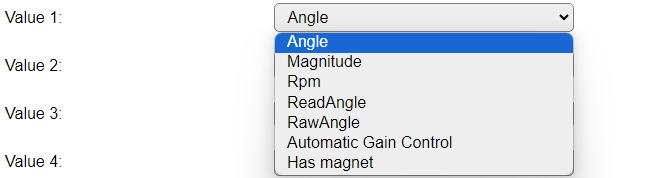
Angle: The currently measured angle, either in degrees or radians, depending on the Output range setting.
Magnitude: The magnetic strength sensed.
Rpm: The rotational speed, if any. Only applicable if used as a rotational sensor.
ReadAngle: The filtered angle value in 0..4095 step range, with Angle offset, Start position and Max position applied.
RawAngle: The unfiltered angle value in 0..4095 step range.
Automatic Gain Control: An automatic gain control is applied, this value returns the current value. When operating the sensor on 5V (an I2C level converter should be used then) the AGC range is 0..255, when operating on 3.3V the AGC range is 0..128.
Has magnet: The state of an available magnet (0 = no magnet, 1 = magnet detected).
Data Acquisition
This group of settings are standard available configuration items.
Single event with all values: When this setting is enabled, all available values will be sent in a single event
<TaskName>#All, with all values in order as arguments to the event.Show derived values: When checked, the Devices overview page, and the
/jsonendpoint (used for updating the Devices overview page) will include any Derived values as defined. See theTaskValueSetDerivedandTaskValueSetPresentationcommands.Event & Log derived values: When checked, the Derived values will be generated as Events, to be handled in Rules, and sent to logging devices like the Syslog server and/or SD-card logging.
(The derived values options are only available if String variables feature is included in the build.)
Send to Controller: Select the Controller(s) to send the Values to, either on a
TaskRuncommand applied to the task, or on an Interval time action.
Send to Controller is only visible when one or more Controllers are configured.
Depending on the controller capabilities, some configuration settings may be shown:

All configured Controllers are shown here, including the enabled or disabled state (multiple Controllers can be enabled, only a single MQTT Controller can be enabled at one time!).
For each controller the user can select wether the data should be sent on each Interval (or explicit TaskRun).
For the Domoticz controllers the value index (IDX) has to be configured.
For some controllers, like Home Assistant/openHAB, there are extra options available.
Group: This represents the group id to combine all values from multiple tasks into a single grouped-device during MQTT AutoDiscovery. Groups, by design, can span multiple ESPEasy devices, if desired, as long as the Task/Valuename combinations are unique. If a group should only combine Tasks from a single ESPEasy unit, the group id should be unique across multiple ESPEasy units. The group description, default Group <n>, can be adjusted in Home Assistant. If the Group value matches the current Unit nr, the Unit name,
%sysname%, is used instead of Group <nr>.Retained: For MQTT Controllers, this setting can be enabled to send the values for the current task with the Retain flag set. The Publish Retain flag in the Controller settings will override this by sending all task values with Retain flag enabled.
Send derived: This checkbox determines if any configured Derived values should also be sent to the controller (and included in the AutoDiscovery if that’s available and enabled).
Resend MQTT Discovery: When checked, will start a resend of the MQTT Discovery process for this task after a random delay, when Submit is clicked, so any changed settings will be updated in the MQTT broker. This setting is only available if the controller is enabled, the Auto Discovery feature is available and enabled for the controller. This setting is not stored.
Other controllers, like f.e. FHEM HTTP, do not support additional settings besides the checkbox to enable sending the data.
Interval By default, Interval for this plugin is set to 0 sec. as events will be generated when a measurement is available. When an Interval is set, the data will be collected and optionally sent to any configured controllers using the interval.
Values
Per Value is a Stats checkbox available, that when checked, gathers the data and presents recent data in a graph, as described here: Task Value Statistics:
Get Config Values
Get Config Values retrieves values or settings from the sensor or plugin, and can be used in Rules, Display plugins, Formula’s etc. The square brackets are part of the variable. Replace <taskname> by the Name of the task.
Config value |
Information |
|---|---|
[<taskname>#Angle] |
Returns the angle, either in degrees or radians, depending on the Output range setting.
|
[<taskname>#Magnitude] |
Returns the current magnetic strength sensed. No unit was provided in the sensor documentation.
|
[<taskname>#Rpm] |
The rotational speed, if any. Only applicable if used as a rotational sensor.
|
[<taskname>#ReadAngle] |
The filtered angle value in 0..4095 step range, with Angle offset, Start position and Max position applied.
|
[<taskname>#RawAngle] |
The unfiltered angle value in 0..4095 step range.
|
[<taskname>#agc] |
An automatic gain control is applied, this value returns the current value. When operating the sensor on 5V (an I2C level converter should be used then) the AGC range is 0..255, when operating on 3.3V the AGC range is 0..128.
|
[<taskname>#Hasmagnet] |
The state of an available magnet (0 = no magnet, 1 = magnet detected).
|
Change log
Changed in version 2.0: …
added 2024-07-02 Initial release version.