Environment - BMP3xx (SPI)
BMP3xx Temperature and Pressure sensors
Plugin details
Type: Environment
Name: BMP3xx (SPI)
Status ESP32: COLLECTION G CLIMATE B
Status ESP8266: COLLECTION G CLIMATE B
GitHub: P172_BMP3xx_SPI.ino
Maintainer: TD-er, tonhuisman
Used libraries: Adafruit BMP3XX Library
Description
As a successor to their BMP280, Bosch made the BMP388 and the even higher resolution BMP390 temperature and air pressure sensors.
The main improvements compared to the BMP280 are:
Lower power consumption
Higher possible sample rate
Option to store a number of samples in the 512 byte buffer to burst read
Higher resolution
Less noise
Note
This plugin uses the same code as plugin P154: Environment - BMP3xx (I2C), only connected via the SPI interface instead of I2C.
Configuration

Name: Required by ESPEasy, must be unique among the list of available devices/tasks.
Enabled: The device can be disabled or enabled. When not enabled the device should not use any resources.
Sensor
GPIO -> CS: Select the GPIO pin that is connected to the CS pin of the board.
Since this chip supports both SPI and I2C, the pin naming may be slightly confusing:
SCL: SPI Clock (CLK)
SDA: Data In (MOSI)
SDO: Data Out (MISO)
CS: Chip Select (CS).
INT: Not used.
Device Settings
Detected Sensor Type: Shows either
BMP38xorBMP390or a number if an unknown sensor ID is detected. (Only shown when the plugin is active.)Altitude: Optionally set the offset from sea level (in meters) of the sensor to convert pressure measurements to sea level pressure.
Data Acquisition
This group of settings are standard available configuration items.
Single event with all values: When this setting is enabled, all available values will be sent in a single event
<TaskName>#All, with all values in order as arguments to the event.Show derived values: When checked, the Devices overview page, and the
/jsonendpoint (used for updating the Devices overview page) will include any Derived values as defined. See theTaskValueSetDerivedandTaskValueSetPresentationcommands.Event & Log derived values: When checked, the Derived values will be generated as Events, to be handled in Rules, and sent to logging devices like the Syslog server and/or SD-card logging.
(The derived values options are only available if String variables feature is included in the build.)
Send to Controller: Select the Controller(s) to send the Values to, either on a
TaskRuncommand applied to the task, or on an Interval time action.
Send to Controller is only visible when one or more Controllers are configured.
Depending on the controller capabilities, some configuration settings may be shown:

All configured Controllers are shown here, including the enabled or disabled state (multiple Controllers can be enabled, only a single MQTT Controller can be enabled at one time!).
For each controller the user can select wether the data should be sent on each Interval (or explicit TaskRun).
For the Domoticz controllers the value index (IDX) has to be configured.
For some controllers, like Home Assistant/openHAB, there are extra options available.
Group: This represents the group id to combine all values from multiple tasks into a single grouped-device during MQTT AutoDiscovery. Groups, by design, can span multiple ESPEasy devices, if desired, as long as the Task/Valuename combinations are unique. If a group should only combine Tasks from a single ESPEasy unit, the group id should be unique across multiple ESPEasy units. The group description, default Group <n>, can be adjusted in Home Assistant. If the Group value matches the current Unit nr, the Unit name,
%sysname%, is used instead of Group <nr>.Retained: For MQTT Controllers, this setting can be enabled to send the values for the current task with the Retain flag set. The Publish Retain flag in the Controller settings will override this by sending all task values with Retain flag enabled.
Send derived: This checkbox determines if any configured Derived values should also be sent to the controller (and included in the AutoDiscovery if that’s available and enabled).
Resend MQTT Discovery: When checked, will start a resend of the MQTT Discovery process for this task after a random delay, when Submit is clicked, so any changed settings will be updated in the MQTT broker. This setting is only available if the controller is enabled, the Auto Discovery feature is available and enabled for the controller. This setting is not stored.
Other controllers, like f.e. FHEM HTTP, do not support additional settings besides the checkbox to enable sending the data.
Interval By default, Interval will be set to 60 sec. The data will be collected and optionally sent to any configured controllers using this interval. If the Interval is set lower or equal than the required 10 * Heater time, the plugin will not start!
Values
The plugin provides the Temperature and Pressure values. A formula can be set to recalculate. The number of decimals can be set as desired, and defaults to 2.
In selected builds, per Value are a Stats and Hide checkbox available, and a coordinate axis combo, that when Stats is checked, gathers the data and presents recent data in a graph, as described here: Task Value Statistics:
Currently the extra features offered by the sensore are not configurable in this plugin. These may be added later.
The internal filtering in the sensor is fixed to these settings:
Temperature: 8x oversampling
Pressure: 4x oversampling
IIR Filter Coefficient: 3
Sample rate: 50 Hz
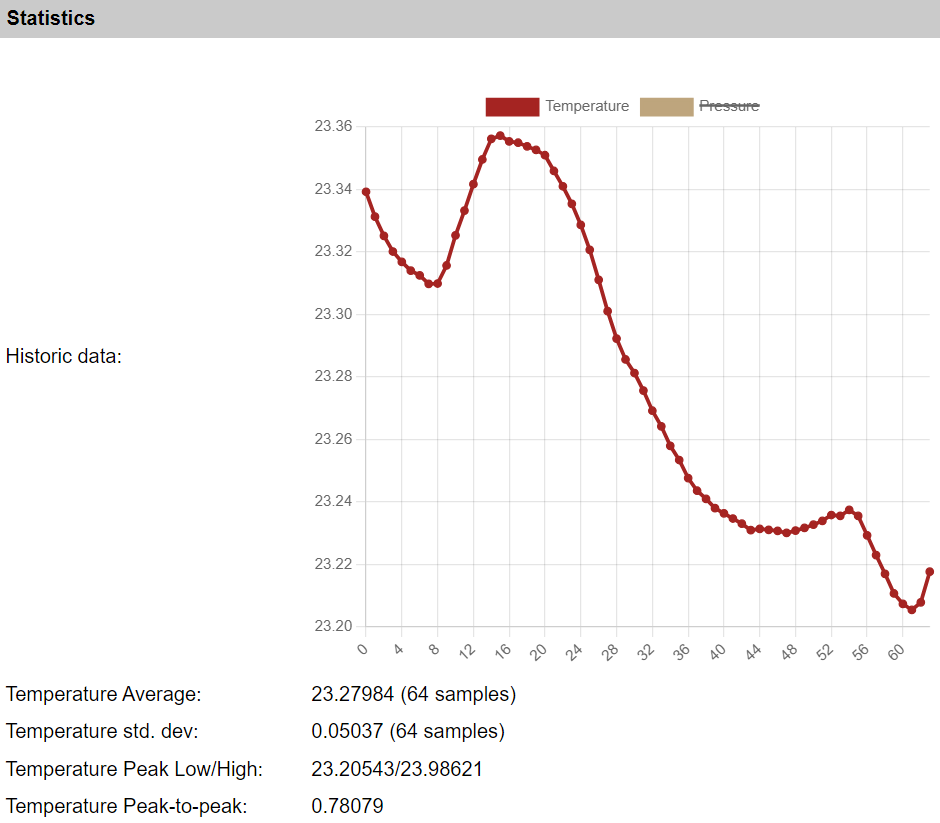
Example of the high temperature resolution of a BMP388
Change log
Changed in version 2.0: …
added 2024-07-13 Initial release of SPI version.