Energy - PZEM-004T (AC) / PZEM-017 (DC)
.
Plugin details
Type: Energy
Name: PZEM-004Tv30 / PZEM-017v1
Status ESP32: ENERGY
Status ESP8266: ENERGY
GitHub: P102_PZEM004Tv3.ino
Maintainer: TD-er tonhuisman
Used libraries: https://github.com/olehs/PZEM004T https://github.com/mandulaj/PZEM-004T-v30
Description
PZEM-004T (AC) V3.0 or Version 3.0 is the upgraded version to replace the old PZEM004T V1.0. The old version has been sold out in most of the online store and is no longer being produced.
Improvements over V1:
Higher resolution
More samples per second
Increased stability
Specifications
Voltage
Measuring range: 80 - 260V
Resolution: 0.1V
Measurement accuracy: 0.5%
Power factor
Measuring range: 0.00 - 1.00
Resolution: 0.01
Measurement accuracy: 1%
Frequency
Measuring range: 45Hz - 65Hz
Resolution: 0.1Hz
Measurement accuracy: 0.5%
Current
Measuring range:
0 - 10A(PZEM-004T-10A)
0 - 100A(PZEM-004T-100A)
Starting measure current:
0.01A(PZEM-004T-10A)
0.02A(PZEM-004T-100A)
Resolution: 0.001A
0.001A(PZEM-004T-10A)
0.01A(PZEM-004T-100A)
Measurement accuracy: 0.5%
Active power
Measuring range:
0 - 2.3kW(PZEM-004T-10A)
0 - 23kW(PZEM-004T-100A)
Starting measure power: 0.4W
Resolution: 0.1W
Measurement accuracy: 0.5%
Active Energy
Measuring range: 0 - 9999.99kWh
Resolution: 1Wh
Measurement accuracy: 0.5%
Description
PZEM-017 v1.0/v2.0 (DC) For measuring DC loads. When the voltage is below 7V, an independent (not from PC USB port!) USB powersupply should be used on the USB input connector.
Specifications
Voltage
Measuring range: 0.05 - 300V
Resolution: 0.01V
Measurement accuracy: 1%
Current
Measuring range:
0.02 - 50/100/200/300A(Depending on shunt)
Resolution: 0.01A
Measurement accuracy: 1%
Active power
Measuring range:
0.2 - 90kW(Depending on shunt)
Starting measure power: 0.2W
Resolution: 0.1W
Measurement accuracy: 1%
Active Energy
Measuring range: 0 - 9999.99kWh
Resolution: 1Wh
Measurement accuracy: 1%
Installation and configuration
When installing multiple PZEM devices on a single ESP unit, some specific order of configuration is required to be able to correctly configure a second, third, etc. PZEM.
This is described below, in the Installing multiple PZEM units on a single ESP paragraph.
Configuration
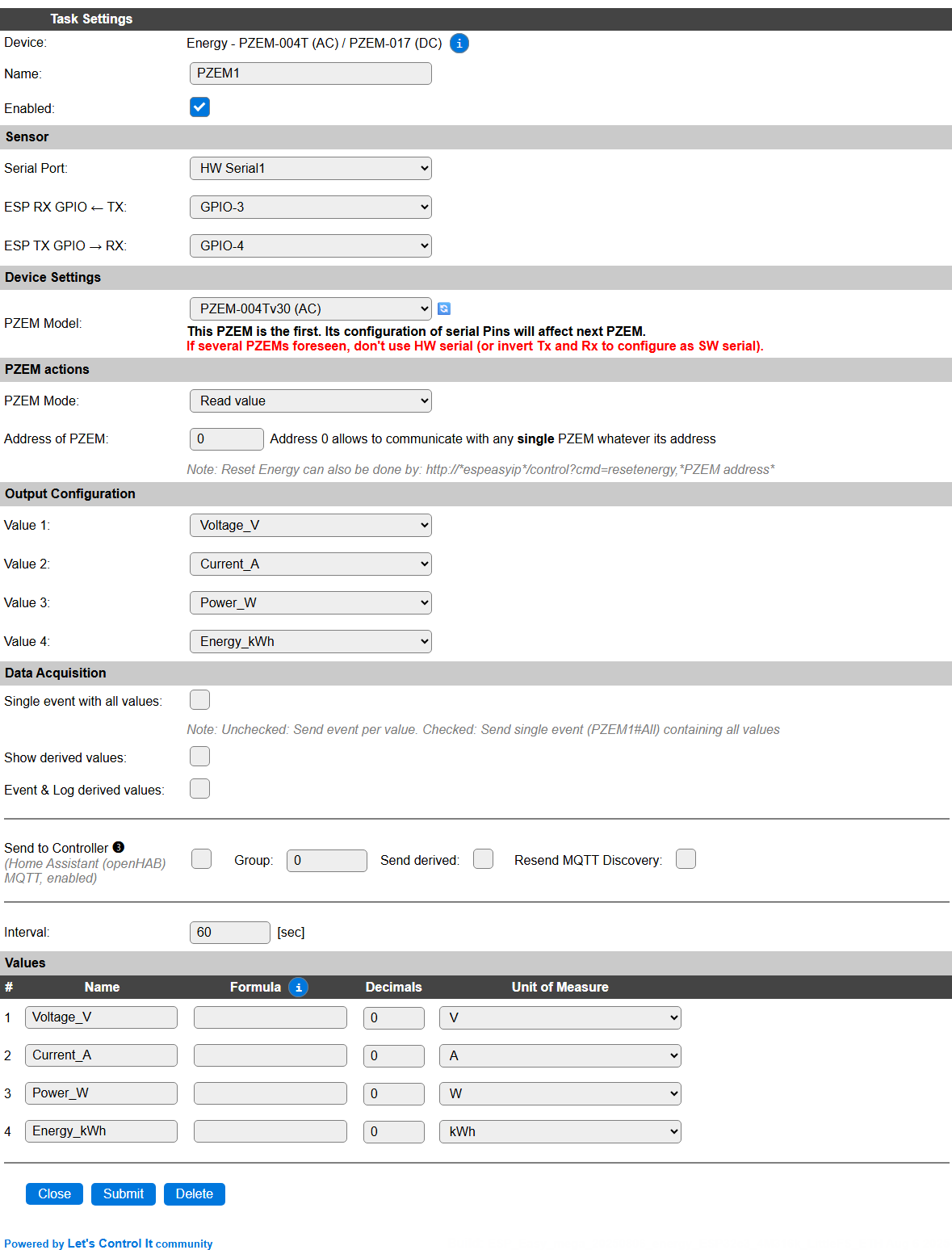
Task Settings
Name: Required by ESPEasy, must be unique among the list of available devices/tasks.
Enabled: The device can be disabled or enabled. When not enabled the device should not use any resources.
Sensor
Device Settings
PZEM Model: Select the PZEM model that is to be handled by this task. (For changing the Address the model doesn’t matter as they use the same command.)
Available options:
PZEM-004Tv30 (AC): The AC model, and default setting.
PZEM-017v1 (DC): The DC model. Also compatible with later v2/2.0 models.
For reading the correct values from a PZEM-017, that Model must be selected as it uses a different data format to fetch the results.
PZEM Actions
PZEM Mode: By default, the
Read valueoption is selected.
Available options:
Read value: Normal operating mode, for reading the configured values from the PZEM.
Reset Energy: For resetting the counted total energy, this option can be selected. See below for a description.
Program address: Only available on the first PZEM device, for changing the PZEM unit MODBUS address, as described below.
Address of PZEM: Set to the address of the PZEM unit to be used. When only a single device is connected, can be set to 0, as a sort of ‘universal’ address.
Available address range for the first PZEM device: 0 .. 247, on subsequent PZEM devices: 1 .. 247.
Output Configuration
For all 4 available Values slots for this task, a value to use can be selected here. The available options depend om the PZEM Model setting:
Voltage_V
Current_A
Power_W
Energy_kWh
Power_Factor_cosphi: for
PZEM-004Tv30 (AC)only.Frequency_Hz: for
PZEM-004Tv30 (AC)only.
Data Acquisition
This group of settings are standard available configuration items.
Single event with all values: When this setting is enabled, all available values will be sent in a single event
<TaskName>#All, with all values in order as arguments to the event.Show derived values: When checked, the Devices overview page, and the
/jsonendpoint (used for updating the Devices overview page) will include any Derived values as defined. See theTaskValueSetDerivedandTaskValueSetPresentationcommands.Event & Log derived values: When checked, the Derived values will be generated as Events, to be handled in Rules, and sent to logging devices like the Syslog server and/or SD-card logging.
(The derived values options are only available if String variables feature is included in the build.)
Send to Controller: Select the Controller(s) to send the Values to, either on a
TaskRuncommand applied to the task, or on an Interval time action.
Send to Controller is only visible when one or more Controllers are configured.
Depending on the controller capabilities, some configuration settings may be shown:

All configured Controllers are shown here, including the enabled or disabled state (multiple Controllers can be enabled, only a single MQTT Controller can be enabled at one time!).
For each controller the user can select wether the data should be sent on each Interval (or explicit TaskRun).
For the Domoticz controllers the value index (IDX) has to be configured.
For some controllers, like Home Assistant (openHAB) MQTT, there are extra options available.
Group: This represents the group id to combine all values from multiple tasks into a single grouped-device during MQTT AutoDiscovery. Groups, by design, can span multiple ESPEasy devices, if desired, as long as the Task/Valuename combinations are unique. If a group should only combine Tasks from a single ESPEasy unit, the group id should be unique across multiple ESPEasy units. The group description, default Group <n>, can be adjusted in Home Assistant. If the Group value matches the current Unit nr, the Unit name,
%sysname%, is used instead of Group <nr>.When Group is used, the Discovery unique id, by default, doesn’t include the taskname, causing devices with the same Value name in the same group to be overwritten in the MQTT broker. By setting the checkbox MQTT Discover, Group incl. Taskname on the Tools/Advanced page, the unique id will be made ‘more unique’ by including the Taskname. (Not enabled by default for backward compatibility).
Retained: For MQTT Controllers, this setting can be enabled to send the values for the current task with the Retain flag set. The Publish Retain flag in the Controller settings will override this by sending all task values with Retain flag enabled.
Send derived: This checkbox determines if any configured Derived values should also be sent to the controller (and included in the AutoDiscovery if that’s available and enabled).
Resend MQTT Discovery: When checked, will initiate a resend of the MQTT Discovery process for this task after a random delay after Submit is clicked, so any changed settings will be updated in the MQTT broker. This setting is only available if the controller is enabled, the Auto Discovery feature is available and enabled for the controller. This setting is not stored.
Other controllers, like f.e. FHEM HTTP, do not support additional settings besides the checkbox to enable sending the data.
Interval: By default, Interval will be set to 60 sec for this plugin. It is the frequency used to read sensor values and send these to any Controllers configured for this device.
Values
The measured values are configured above, and get their names based on the selection made there.
For a complete description of all available columns see the Plugin - Values section.
Resetting the Energy counter
For resetting the counted Energy value in the PZEM unit, there are 2 methods:
Use the Reset Energy PZEM Mode setting.
Send the command
resetenergy,<modbus_address>to the ESP unit. This can be done via the Command entry on the Tools page, from Rules, or via a url command as shown in the configuration page.
Use the Reset Energy PZEM Mode setting
For resetting the incrementing Energy counter in the PZEM unit, this PZEM Mode option can be used.
Set PZEM Mode to
Reset Energy, and Submit the page.
The command will be executed immediately, and afterward the status will shown:

The blue message showing that the command was sent. The PZEM Mode is already reset to Read value.
To store this change in settings, the Submit button should be used once more (you can of course change more settings if desired, that’s why no automatic save is done.)
Send the resetenergy,<modbus_address> command
For an easy alternative to reset the Energy counter, you can use the resetenergy,<modbus_address> command, f.e. from the Command field on the Tools page, to reset the counter for the specific modbus address (range 1..247, or 0 if only 1 device is on the bus).
Installing multiple PZEM units on a single ESP
Configuring separate MODBUS addresses on each device
To uniquely identify each PZEM unit on the bus, it has to be configured to use a unique address. The range of these addresses is 1 .. 247.
Add the, numerically, first PZEM task, f.e. in Devices slot 1.
Configure the serial port, and on ESP32 also the GPIO pins, to be used, enable the plugin, and connect a single PZEM to the RS485 converter. When using
HW Serial0, the Serial Console Settings, on the Tools/Advanced page, have to be disabled to avoid issues with his port.Set PZEM Mode to
Program addressand Submit the page.
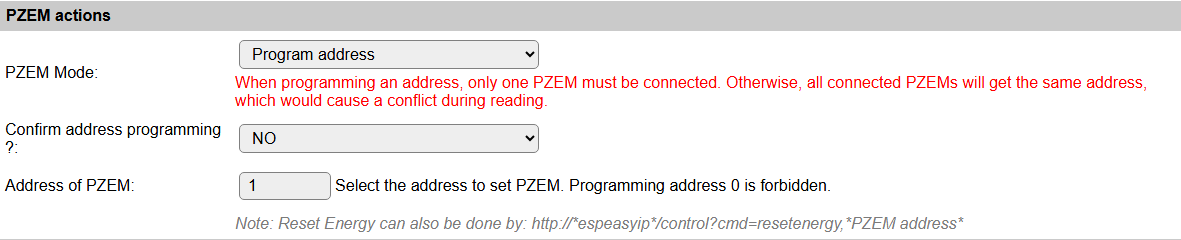
Fill the desired address in the Address of PZEM field, change the Confirm address programming ? field to YES, and again Submit the page.
When successful, a message Address programming done ! is displayed, and the PZEM Mode is set to the default Read value setting.
Disconnect the PZEM unit from the RS485 bus, connect the next PZEM unit, and repeat above steps, using a diferent Address of PZEM value, for all units to be connected.
N.B.: The last set Address of PZEM will be kept in the configuration, but can be changed to the desired first PZEM unit.
N.B.2: To correctly store the PZEM Mode setting, the configuration should be saved once more, using the Submit button!
Configuring a secondary PZEM unit
The first PZEM unit can be configured as shown above in the generic Configuration paragraph. Once thats completed, with the correct, unique, MODBUS Address set, both in all PZEM units to connect and the task configuration for the first PZEM task, that task should be Enabled, so the next task added can detect that it will be the second (or third, etc.) device on the MODBUS chain.
After that task is running, a new PZEM task can be added, with a task number higher than the first PZEM task.
Warning
This is crucial for the PZEM tasks to start correctly, and in the correct order, on reboot or power-up of the ESP!
These secondary PZEM tasks do not use the Serial configuration, as they use the same connection as the first PZEM task.
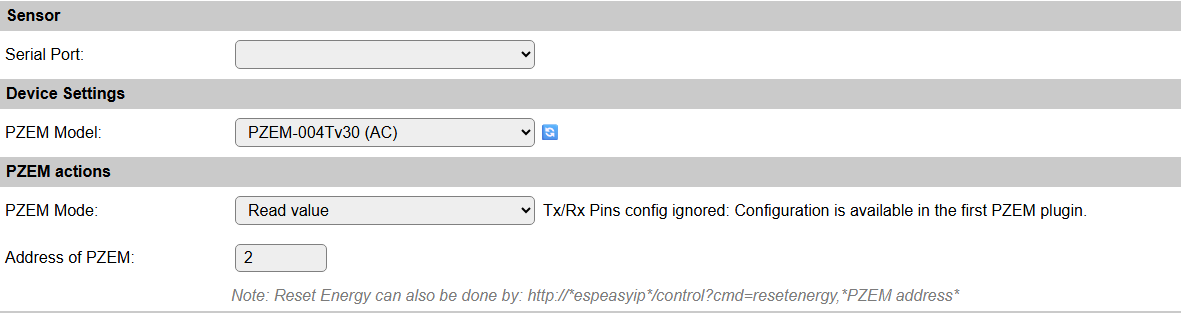
Sensor
This selector should not be used, as it is ignored.
Device Settings
PZEM Model: Select the PZEM model that is to be handled by this task. (Changing the selection will save the new setting and reload the page.)
For reading the correct values from a PZEM-017, that Model must be selected as it uses a different data format to fetch the results.
PZEM Actions
PZEM Mode: By default, the
Read valueoption is selected.
Available options:
Read value: Normal operating mode, for reading the configured values from the PZEM.
Reset Energy: For resetting the counted total energy, this option can be selected. See above for a description.
Address of PZEM: Set to the address of the PZEM unit to be used.
Available address range: 1 .. 247.
When using the same address as the first PZEM task, and the PZEM Model connected is a PZEM-004Tv30 (AC), the extra values Power_Factor_cosphi and Frequency_Hz can be made available in a task, for sending to a controller.
Commands
Command Syntax |
Extra information |
|---|---|
ResetEnergy,<modbus_address> |
This command will reset the Energy counter for the PZEM unit (value is stored in the unit). The value retrieved on the next read should return the updated value. (Can be 0 if no energy is flowing, or the energy counted since the reset command was executed.)
This command can be executed by any task if multiple PZEM tasks are configured, as they all share the single MODBUS Serial configuration of the first PZEM task.
|
Change log
Changed in version 2.0: …
added 2025-08-06: Support for PZEM-017, updated documentation.
added 2020-04-25