Environment - I2C Honeywell Pressure
I2C Honeywell Pressure
Plugin details
Type: Environment
Name: I2C Honeywell Pressure
Status ESP32: COLLECTION F CLIMATE
Status ESP8266: COLLECTION F CLIMATE
GitHub: P151_Honeywell_pressure.ino
Maintainer: TD-er
Used libraries: .
Description
The Honeywell TruStability™ HSC Series are calibrated pressure sensors with internal temperature compensation. This series has a lot of versions of pressure sensors ranging in form factor, pressure range, etc.
Hardware
See the datasheet for all versions.
Page 13 is a must to help decode the nomenclature of the model numbers.
Pages 17 - 29 are about the various form factors of these sensors.
The digital versions of these sensors typically output a 14 bit value ranging from 0 … 16383.
The usable (and compensated) range is typically 10% - 90% of the full range. These 10% and 90% points are also the specified range of the sensor.
For example, a differential sensor ranging -1 … 1 bar, will output:
1638= -1 bar14746= 1 bar
In practice, the sensor can measure from 2.5% upto 97.5% of the full range before it will start clipping.
Configuration
Name: Required by ESPEasy, must be unique among the list of available devices/tasks.
Enabled: The device can be disabled or enabled. When not enabled the device should not use any resources.
Device Settings
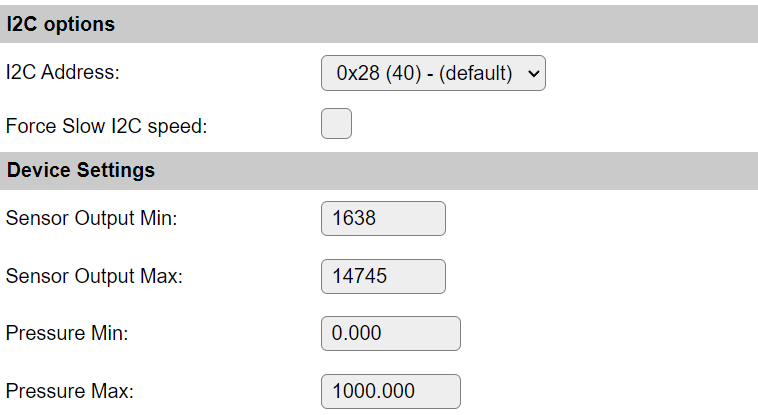
Sensor Output Min and Max must be set to resp. 10% and 90% of the digital count range.
Sensor Output MinDefault to 1638 (10% of 2^14)Sensor Output MaxDefault to 14745 (90% of 2^14)Pressure MinMinimal stated pressure for the given sensor.Pressure MaxMaximal stated pressure for the given sensor.
For example, given the HCSMANV001BA2A3 sensor:
MSMTANSingle Axial barbed portVLiquid Media port 1, diagnostics on001BA0 bar to 1 bar2I2C address 0x28A10% to 90% 2^14 digital33V3
The measurement range for this sensor is 0 … 1 bar.
This means the Pressure Min and Pressure Max should be set to resp. 0 and 1.
However, if the pressure in some container needs to be compared to some outside pressure, measured by for example a Bosch BMP280, it might be useful to directly output to mbar.
Thus for this purpose the Pressure Max should be set to 1000.
Data Acquisition
This group of settings are standard available configuration items.
Single event with all values: When this setting is enabled, all available values will be sent in a single event
<TaskName>#All, with all values in order as arguments to the event.Show derived values: When checked, the Devices overview page, and the
/jsonendpoint (used for updating the Devices overview page) will include any Derived values as defined. See theTaskValueSetDerivedandTaskValueSetPresentationcommands.Event & Log derived values: When checked, the Derived values will be generated as Events, to be handled in Rules, and sent to logging devices like the Syslog server and/or SD-card logging.
(The derived values options are only available if String variables feature is included in the build.)
Send to Controller: Select the Controller(s) to send the Values to, either on a
TaskRuncommand applied to the task, or on an Interval time action.
Send to Controller is only visible when one or more Controllers are configured.
Depending on the controller capabilities, some configuration settings may be shown:

All configured Controllers are shown here, including the enabled or disabled state (multiple Controllers can be enabled, only a single MQTT Controller can be enabled at one time!).
For each controller the user can select wether the data should be sent on each Interval (or explicit TaskRun).
For the Domoticz controllers the value index (IDX) has to be configured.
For some controllers, like Home Assistant (openHAB) MQTT, there are extra options available.
Group: This represents the group id to combine all values from multiple tasks into a single grouped-device during MQTT AutoDiscovery. Groups, by design, can span multiple ESPEasy devices, if desired, as long as the Task/Valuename combinations are unique. If a group should only combine Tasks from a single ESPEasy unit, the group id should be unique across multiple ESPEasy units. The group description, default Group <n>, can be adjusted in Home Assistant. If the Group value matches the current Unit nr, the Unit name,
%sysname%, is used instead of Group <nr>.When Group is used, the Discovery unique id, by default, doesn’t include the taskname, causing devices with the same Value name in the same group to be overwritten in the MQTT broker. By setting the checkbox MQTT Discover, Group incl. Taskname on the Tools/Advanced page, the unique id will be made ‘more unique’ by including the Taskname. (Not enabled by default for backward compatibility).
Retained: For MQTT Controllers, this setting can be enabled to send the values for the current task with the Retain flag set. The Publish Retain flag in the Controller settings will override this by sending all task values with Retain flag enabled.
Send derived: This checkbox determines if any configured Derived values should also be sent to the controller (and included in the AutoDiscovery if that’s available and enabled).
Resend MQTT Discovery: When checked, will initiate a resend of the MQTT Discovery process for this task after a random delay after Submit is clicked, so any changed settings will be updated in the MQTT broker. This setting is only available if the controller is enabled, the Auto Discovery feature is available and enabled for the controller. This setting is not stored.
Other controllers, like f.e. FHEM HTTP, do not support additional settings besides the checkbox to enable sending the data.
Change log
Changed in version 2.0: …
added 2023-04-12 Initial release version.