Environment - Sensirion SEN5x (IKEA Vindstyrka)
Sensirion SEN5x (IKEA Vindstyrka)
Plugin details
Type: Environment
Name: Sensirion SEN5x (IKEA Vindstyrka)
Status ESP32: CLIMATE A
Status ESP8266: CLIMATE A
GitHub: P167_Vindstyrka.ino
Maintainers: AndiBaciu, tonhuisman
Used libraries: .
Description
The Sensirion SEN5x series of sensors measure Particle matter (all models), Temperature, Humidity and tVOC (SEN54, SEN55) and NOx (SEN55).
This plugin can read all values from these sensors.
In addition, the IKEA Vindstryka, that has a Sensirion SEN54 installed, can be ‘piggy-backed’ with this plugin, eavesdropping on the I2C communication to retrieve the values.
Hardware setup
When connecting a stand-alone Sensirion SEN5x sensor, be sure to power the unit with 5V! The I2C SDA/SCL signals are 3.3V safe, so these can be directly connected to an ESP. Pull-up resistors to 3.3V might be needed, as they are not installed on the device!
When installing an ESP inside an IKEA Vindstyrka, the procedure of wiring this is rather simple: Connect GND, SDA and SCL to the configured ESP pins (VCC for the ESP can also be reused from the power source for the Vindstryka), connect the MonPin SCL configured GPIO pin also to SCL, and the plugin will wait for the IKEA controller to finish communication and then fetch the data from the sensor.
Configuration

Name: Required by ESPEasy, must be unique among the list of available devices/tasks.
Enabled: The device can be disabled or enabled. When not enabled the device should not use any resources.
I2C options
The available settings here depend on the build used. At least the Force Slow I2C speed option is available, but selections for the I2C Multiplexer can also be shown. For details see the I2C Bus page
Note
According to the documentation, the SEN5x sensors support a max. I2C Clock Speed of 100 kHz, Force Slow I2C speed should be checked. (ESPEasy has a default setting of 100 kHz for I2C Slow device Clock Speed).
Device Settings
Model Type: Select the sensor model used, available options:

IKEA Vindstyrka The default, with the ability to eavesdrop on the I2C communication of the Vindstyrka controller and the installed SEN54.
SEN54 The stand-alone model, providing the same values as the Vindstyrka. This setting can also be used when installing a SEN50, but only the PM* values can be used on that sensor.
SEN55 The most advanced model, adding support for the NOx index.
When this setting is changed, the page is saved and reloaded to show/hide the extra setting to configure MonPin SCL.
MonPin SCL: (Only available for IKEA Vindstryka) Select the GPIO pin that is connected to the I2C SCL pin. It is used to monitor the I2C communication by the IKEA controller, so we don’t interfere with that.
If the plugin is enabled, Device info for the sensor is shown in the Configuration page:

This includes any warnings received from the sensor, and counters for pass/fail/errCode.
The fail value is usually 1 or 2, because of the startup time of the sensor, that often returns a failed reading. If this number increases, then a check for I2C pull-up resistors should be done, as that is a requirement for I2C devices, and also, short wires have to be used for stable communication.
Technical logging: When debugging the hardware setup, especially when installing an ESP inside an IKEA Vindstryka, it can be helpful to have some extra technical logging available (INFO level).
Output Configuration
Number Output Values: Select the number of values that should be available, available options:

Value 1..4: For each of the output values configured, the value to show can be configured, some defaults have been preselected. Available options:
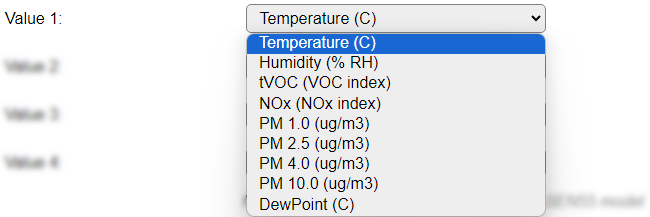
A description per available value is documented below, in the Get Config Values section.
N.B.: NOx is only available when a Sensirion SEN55 is installed, but is always shown as an option.
N.B.2: The selected options determine the names of the output Values.
Data Acquisition
This group of settings are standard available configuration items.
Single event with all values: When this setting is enabled, all available values will be sent in a single event
<TaskName>#All, with all values in order as arguments to the event.Show derived values: When checked, the Devices overview page, and the
/jsonendpoint (used for updating the Devices overview page) will include any Derived values as defined. See theTaskValueSetDerivedandTaskValueSetPresentationcommands.Event & Log derived values: When checked, the Derived values will be generated as Events, to be handled in Rules, and sent to logging devices like the Syslog server and/or SD-card logging.
(The derived values options are only available if String variables feature is included in the build.)
Send to Controller: Select the Controller(s) to send the Values to, either on a
TaskRuncommand applied to the task, or on an Interval time action.
Send to Controller is only visible when one or more Controllers are configured.
Depending on the controller capabilities, some configuration settings may be shown:

All configured Controllers are shown here, including the enabled or disabled state (multiple Controllers can be enabled, only a single MQTT Controller can be enabled at one time!).
For each controller the user can select wether the data should be sent on each Interval (or explicit TaskRun).
For the Domoticz controllers the value index (IDX) has to be configured.
For some controllers, like Home Assistant/openHAB, there are extra options available.
Group: This represents the group id to combine all values from multiple tasks into a single grouped-device during MQTT AutoDiscovery. Groups, by design, can span multiple ESPEasy devices, if desired, as long as the Task/Valuename combinations are unique. If a group should only combine Tasks from a single ESPEasy unit, the group id should be unique across multiple ESPEasy units. The group description, default Group <n>, can be adjusted in Home Assistant. If the Group value matches the current Unit nr, the Unit name,
%sysname%, is used instead of Group <nr>.Retained: For MQTT Controllers, this setting can be enabled to send the values for the current task with the Retain flag set. The Publish Retain flag in the Controller settings will override this by sending all task values with Retain flag enabled.
Send derived: This checkbox determines if any configured Derived values should also be sent to the controller (and included in the AutoDiscovery if that’s available and enabled).
Resend MQTT Discovery: When checked, will start a resend of the MQTT Discovery process for this task after a random delay, when Submit is clicked, so any changed settings will be updated in the MQTT broker. This setting is only available if the controller is enabled, the Auto Discovery feature is available and enabled for the controller. This setting is not stored.
Other controllers, like f.e. FHEM HTTP, do not support additional settings besides the checkbox to enable sending the data.
Interval By default, Interval will be set to 60 sec. The data will be collected and optionally sent to any configured controllers using this interval.
Values
The plugin provides the configured values, with their default names.
Per Value is a Stats checkbox available, that when checked, gathers the data and presents recent data in a graph, as described here: Task Value Statistics:
Commands available
Command Syntax |
Extra information |
|---|---|
sen5x,Startclean |
Starts the built-in cleaning cycle of the device.
N.B.: Normally this shouldn’t be needed, as the device automatically starts a weekly cleaning cycle, but if the device is not switched on continuously, this timer is reset on power-on, but the device still needs a cleaning cycle once a week.
|
sen5x,Techlog,<0|1> |
Enable or disable the
Technical logging option, available in the UI. This logging is mostly useful when debugging either the hardware or software setup.The setting is not stored automatically.
|
Get Config Values
Get Config Values retrieves values or settings from the sensor or plugin, and can be used in Rules, Display plugins, Formula’s etc. The square brackets are part of the variable. Replace <taskname> by the Name of the task.
Config value |
Information |
|---|---|
[<taskname>#Temperature] |
Returns the last measured Temperature in degrees Celcius.
|
[<taskname>#Humidity] |
Returns the last measured Humidity (%RH).
|
[<taskname>#tVOC] |
Returns the last measured tVOC (total volatile organic compounds) value in range 0..500 index points. Measurement range 0..1000 ppm.
|
[<taskname>#NOx] |
Returns the last measured NOx value (Nitrogen Oxides) value in range 0..500 index points.
|
[<taskname>#PM1p0][<taskname>#PM2p5][<taskname>#PM4p0][<taskname>#PM10p0] |
Returns the last measured Particle concentration in μg/m3 for respectively 1.0 μm, 2.5 μm, 4.0 μm and 10.0 μm particle size.
|
[<taskname>#Dewpoint] |
Returns the calculated Dew point, from the Temperature and Humidity values.
|
Change log
Changed in version 2.0: …
added 2024-05-05 Enable support for SEN54 and SEN55 stand-alone sensors, add Get Config Values and Commands.
added 2024-04-15 Initial release version supporting IKEA Vindstyrka.